


Summary - AI Note Taker
4.7904.00 Reviews
App Specs
- Version
- 2.18.7
- Updated On
- License
- Free
- Downloads
- 1,000,000+
- Developer
- Labhouse Mobile
- Categories
- Productivity
- Platform
- Android
Screenshots
 Analysis by AppCompare
Have you ever been in a meeting where the conversation flows so fast that taking notes feels like an Olympic sprint? Trust me, I've been there. That's why I was thrilled to try out Summary - AI Note Taker. This app promises to make note-taking a breeze, and I couldn’t wait to see if it lived up to the hype.
What the interface needs to make easy
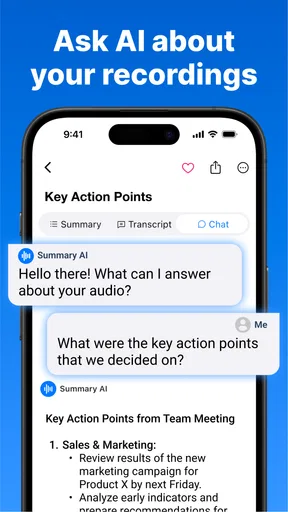
For a note-taking app to help rather than distract, I need to understand where a recording starts, where its transcript lives, and how to get back to the useful points afterward. A clean screen can make that path less tiring, especially when I am already listening to a discussion. In practice, I would treat the transcript and its summary as separate tools: the transcript is for checking what was said, while the shorter version is for deciding what deserves attention now.
That distinction matters for readers who process information at different speeds. A concise summary can reduce the amount of text to scan, but it should not replace a transcript when the exact wording matters. I would keep both available during follow-up, using the summary to orient myself and the longer text to verify names, decisions, or a phrase whose meaning depends on context. Readable notes are useful only when they remain easy to check.
Listening, speaking, and physical interaction
Audio-first tools can be helpful when typing is uncomfortable, slow, or impractical. Someone who finds it easier to listen than to write may benefit from having speech turned into text, while a person who relies on written information can review the conversation afterward rather than trying to catch every spoken detail in real time. It can also help when a participant needs to stay focused on a conversation instead of dividing attention between listening and writing.
There is a trade-off: recording still depends on a usable audio environment, and working with a transcript usually means reading and navigating text on a phone. If that is difficult for you, or if you need larger text, a keyboard-based workflow, or specific assistive options, check how the app behaves on your device before relying on it for an important session. I would test it with a short, low-stakes recording first rather than discovering friction during a class or work meeting.
When the setting changes
The same recording can be useful in several situations, but the room and the purpose change what I expect from it. In a quiet one-to-one conversation, it may be easier to follow a speaker and later revisit a point. In a lively meeting, overlapping voices and room noise can make the transcript less dependable, so I would use the generated text as a working aid rather than a perfect record. For a lecture or interview, I would note the time or topic when an important point comes up, then check it against the transcript afterward.
There is also a practical choice about attention. If I am participating in a meeting, I would start the recording before the discussion gets underway and then stay present instead of repeatedly checking the phone. Afterward, I would review the summary while the conversation is still fresh, correct any unclear details I notice, and turn only confirmed decisions into follow-up tasks. That small routine makes an automated note more useful than simply keeping a long transcript untouched.
Worth Reading Before You Choose

EA SPORTS FC Mobile 26 Is a Bigger Football Game, but It Takes Time

Flipboard Shows What News Apps Must Do Beyond the Feed

Switching to Android Auto Means Rethinking Your Driving Routine

Google Calendar Makes a Crowded Week Easier to Manage

Ludo King Makes the Most of the Minutes Between Plans

Baby Panda World Brings Quick Play to Modern Phones, but Its Game Library Feels Busy
Where an audio note taker may not fit
Not every conversation is suitable for recording. If people have not agreed to it, or the discussion contains sensitive information, I would pause and consider whether recording is appropriate before opening the app. A transcript can make spoken material easier to revisit and share, which is useful for coordination but also means I should be thoughtful about who receives it. For private or high-stakes discussions, a purpose-built, approved workflow may be a better choice than a general note-taking app.
It is also not a substitute for careful human judgment. A summary can make a discussion easier to review, but a compressed version may leave out qualifications, uncertainty, or disagreement. I would not rely on it alone for formal minutes, exact quotations, or decisions where a small wording difference matters. In those cases, the sensible approach is to verify the full transcript and, when needed, compare it with the participants’ own notes.
Getting Started with Summary - AI Note Taker
First things first: downloading and setting up Summary - AI Note Taker is as straightforward as it gets. Whether you're on Android or iOS, just head over to your app store, hit install, and you’re good to go. The app doesn’t bombard you with endless setup questions, which is a breath of fresh air. Just a simple sign-up, and you're on your way to smarter note-taking.
Labhouse Mobile makes this a free productivity app, with optional in-app purchases priced from $8.99 to $79.99 per item. Its 4.6 average from around 34,000 ratings and more than 500,000 installs suggest that plenty of people have tried it, though popularity does not tell me whether its workflow will suit you. It is rated for Everyone, and version 2.10.0 runs on Android 7.0 or later. I would begin with the free experience and decide whether the paid options solve a specific need before spending anything.
If you are choosing between this and a standard notes app, the difference is the starting point: a conventional notebook expects you to type or write, while this app is built around capturing spoken material and making it easier to revisit. A basic voice recorder may preserve the sound, but it leaves you to listen through the recording to find a particular point. Here, transcription and summaries can shorten that review process. On the other hand, a simple notes app is usually the better pick for quick lists, private reminders, or information that does not begin as speech.
Features That Stand Out
Once you dive into the app, the first thing you'll notice is its sleek, user-friendly interface. But what really caught my attention were the powerful features packed into this little gem. Let’s break down a few of them:
- AI-Powered Transcription: This is where the magic happens. The app listens to your meetings or lectures and automatically transcribes them into clear, organized notes. The AI is impressively accurate, even with fast speakers or heavy accents.
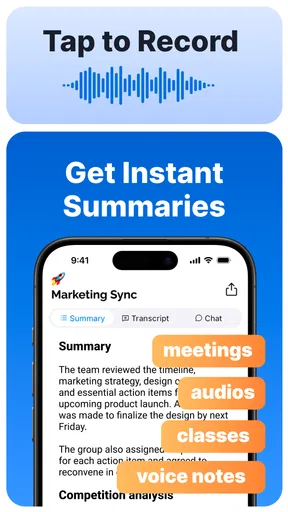
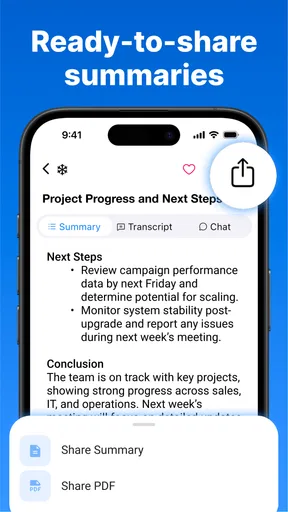
- Summarization: After transcribing, the app condenses lengthy discussions into concise summaries, ensuring you capture the essence without wading through pages of text. Ideal for those days when time is of the essence.
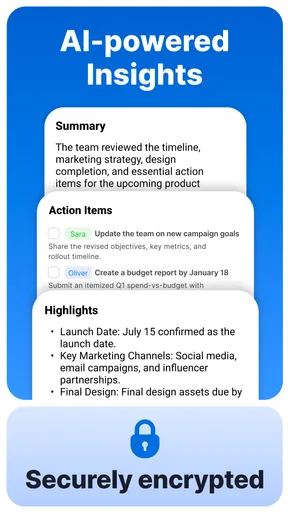
- Keyword Highlights: It highlights key phrases and action items, making it easy to review important points at a glance. This feature is a lifesaver when you need to follow up on critical tasks.
- Integration with Other Tools: Summary integrates seamlessly with popular tools like Slack, Zoom, and Google Calendar, allowing for a smooth workflow without constantly switching apps.
Real-World Application
In a real-world setting, this app shines. I tested it during a team meeting, and it was like having a personal assistant who never misses a beat. The transcription was spot-on, even picking up on industry-specific jargon, which was a pleasant surprise.
A useful way to apply that workflow is to give each recording a clear purpose before you start. For a planning meeting, I would listen for decisions and owners; for a lecture, I would look for explanations that need a second pass; for an interview, I would mark the themes I want to revisit. This keeps the summary from becoming a substitute for thinking. It becomes a map back to the parts of the conversation that matter.
For example, imagine I have a project check-in between other tasks. I can focus on contributing instead of trying to write down every sentence, then use the summary to recall the main threads. Before sending a recap, I would confirm names, dates, and responsibilities against the transcript or my own memory. That extra check is especially valuable when several people volunteer ideas or when a tentative suggestion could be mistaken for a final decision.
Reviewing the summary post-meeting was a breeze. It highlighted the main discussion points and action items, which I could easily share with team members via email or our Slack channel. No more scrambling to remember who said what or what the next steps were. It’s all right there, neatly organized.
For a student, the same approach can make a long class easier to revisit: use the summary to identify the central topics, then return to the transcript for a definition or explanation that needs more context. For a professional, it can help prepare a concise recap after a discussion. I would still avoid forwarding generated notes without a quick review; summaries save time, but a brief human check protects against passing along a point that was incomplete or misunderstood.
A small habit that improves the result is to review notes soon after the conversation, rather than treating the transcript as an archive to search weeks later. When the context is fresh, it is easier to spot a misheard term or clarify what an action item refers to. If I need to preserve a detail exactly, I would keep the relevant transcript passage in view instead of relying on a shortened summary.
A Few Considerations
No app is perfect, and Summary - AI Note Taker is no different. While the transcription accuracy is generally impressive, it might stumble with overlapping voices or background noise. A quiet environment helps maintain accuracy, so keep that in mind during use.
This limitation shapes who I would recommend it to. It is a strong fit for people who regularly need to turn spoken discussions into reviewable notes and are comfortable checking the result. It is less suitable if you need a guaranteed verbatim record, work mostly in noisy spaces, or cannot use audio capture in the setting where you take notes. A keyboard-first notebook or a dedicated recorder may be more practical for those situations.
Also, while the integration features are fantastic, setting them up can be a bit tricky. A little patience goes a long way, but once configured, it’s smooth sailing.
If you prefer to keep your process simple, you do not have to build an elaborate connected workflow for the app to be useful. Start with one ordinary meeting, see whether the transcript is readable, and decide whether the summary saves enough review time. If connecting other tools feels like extra work, use the app for capture and review on its own rather than making setup a project of its own.
Final Thoughts
All things considered, Summary - AI Note Taker is a game-changer for anyone who needs to capture and organize information quickly and efficiently. Whether you're a student, a professional, or just someone who loves staying organized, this app has something for you.
My inclusive verdict is positive, with a practical caveat: an audio-and-text workflow can support different ways of taking in information, but it will not remove every barrier. The quality of the room, comfort with reading on a phone, and ability to review generated notes all matter. I would recommend trying it in a familiar, low-pressure setting before depending on it for an important conversation.
It combines cutting-edge AI technology with user-friendly design to create an invaluable tool for modern note-taking. If you're tired of juggling notebooks and missing important details, give this app a shot. You might just find it’s the assistant you never knew you needed.
Pros
- Intuitive user interface for easy navigation.
- Syncs seamlessly across multiple devices.
- Offers voice-to-text transcription.
- Supports various file formats for export.
- Provides customizable organization features.
Cons
- Limited free version with basic features.
- Requires internet for certain functionalities.
- Occasional transcription errors.
- No offline mode for note-taking.
- Lacks integration with some popular apps.
FAQs for Summary - AI Note Taker
What is Summary - AI Note Taker and how does it work?
Summary - AI Note Taker is an innovative app designed to help users effortlessly capture and organize notes using artificial intelligence. The app transcribes spoken words into text and summarizes them into concise, easy-to-read notes. It uses natural language processing to ensure accuracy and relevance, making it an invaluable tool for meetings, lectures, and personal reminders.
Is Summary - AI Note Taker available for both Android and iOS devices?
Yes, Summary - AI Note Taker is available on both Android and iOS platforms. Users can download it from the Google Play Store or the Apple App Store. The app is designed to work seamlessly across various devices, ensuring that you can access your notes wherever you are.
Does Summary - AI Note Taker require an internet connection to function?
The app requires an internet connection for its AI features, as it relies on cloud-based processing to transcribe and summarize notes. However, once notes are created and saved, they can be accessed offline. For optimal performance, especially during live transcriptions, a stable internet connection is recommended.
How secure is the data stored in Summary - AI Note Taker?
Summary - AI Note Taker places a high priority on user privacy and data security. The app uses encryption to protect your notes and personal information. Additionally, data is stored securely in the cloud, and users have control over their data, including the ability to delete notes permanently.
Are there any costs associated with using Summary - AI Note Taker?
Summary - AI Note Taker offers both free and premium plans. The free version includes basic features, while the premium plan unlocks advanced functionalities like unlimited storage and priority customer support. Users can choose the plan that best suits their needs, with the option to upgrade at any time.


